AI PDF Reader & Scanner
Gushan TechnologyProductivity
4.081.00 Reviews
- Version
- 1.0.4
- Installs
- 100.00K
- Age Rating
- Everyone
Screenshots
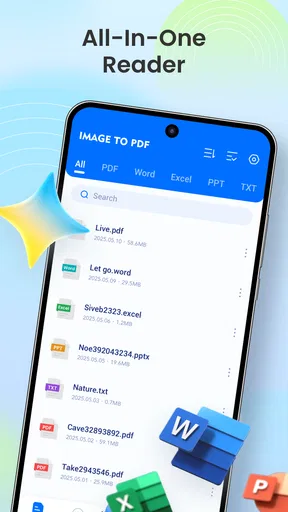
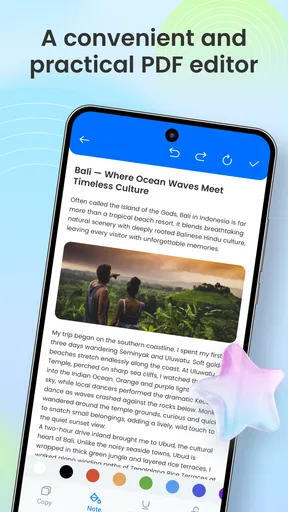
Our Review of AI PDF Reader & Scanner
 Analysis by Appyee
AI PDF Reader & Scanner is the kind of productivity app I would reach for when a document arrives on my phone and I need to understand, organize, or handle it without opening a full desktop office suite. Developed by Gushan Technology, it is built around PDFs and other office documents, with an AI-focused reading experience suggested by its name. After using it as a mobile document tool, my impression is that its main appeal is convenience: it puts document reading and basic file handling in one place, while keeping the entry cost at zero.
The app is free, rated for Everyone, and works on Android devices running version 8.0 or later. Its current version is 1.0.1, so I see it as a relatively young tool rather than a mature replacement for every office application. That matters when deciding what to expect. I would recommend it to someone who regularly receives PDFs, checks forms, reads work documents, or wants a simpler document workflow on a phone. I would be more cautious about recommending it as the only tool for complex editing, advanced business collaboration, or demanding document production.
How the reading experience feels in everyday use
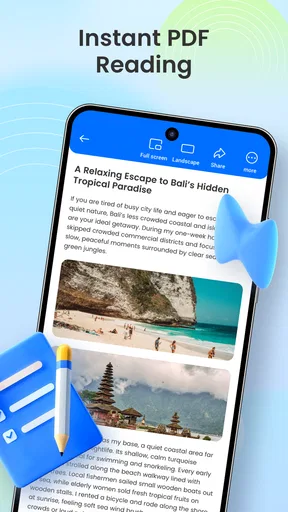
My first test with an app like this is not an unusually large document. It is the ordinary situation: a PDF arrives through a message, I open it while away from my computer, and I want to find the important part quickly. AI PDF Reader & Scanner is aimed at that moment. The combination of document reading and AI wording suggests a workflow that goes beyond merely displaying pages, especially for readers who want help making sense of dense material.
The biggest practical advantage is reducing the number of steps between receiving a file and doing something useful with it. Instead of moving immediately between a file manager, a separate PDF viewer, and another office app, I can treat the phone as the central place for the document. That is particularly helpful for students reviewing handouts, freelancers checking client files, and anyone who keeps reference documents locally on a mobile device.
Speed expectations should remain realistic. A simple PDF should feel like a light task for a modern phone, but an AI-assisted reading action is different from ordinary page viewing. Opening a document and asking for help with its contents may involve more processing than scrolling through pages. I would therefore judge the app in two parts: the basic reader should be quick enough for routine checks, while more involved document analysis deserves a little patience.
That distinction is useful because it prevents a common mistake. If a document opens promptly but an intelligent action takes longer, that does not necessarily mean the whole app is slow. Conversely, if a user mainly wants instant page turning, the AI layer may not add enough value to justify choosing this over a basic PDF viewer. For me, the app makes the most sense when interpretation and organization matter as much as display.
A realistic workday scenario
Imagine receiving a several-page policy document shortly before a meeting. I would open it in the app, scan the headings, look for the section related to my task, and use the reading workflow to clarify the parts that are difficult to digest. I would then keep the original file available for checking exact wording. That last step is important: an AI-assisted explanation can save time, but the source document remains the authority when a deadline, requirement, or legal detail is involved.
This is also where I see a less obvious strength. The app can serve as a first-pass filter rather than a final decision-maker. I can use it to identify what deserves closer attention, then return to the original page before acting. That workflow is safer and more efficient than treating an automatic summary or explanation as a replacement for reading the source.
What happens when document use becomes heavier
Light reading is only part of the test. A more demanding session might involve switching among several office documents, returning to a PDF after another task, or working through a long file while the phone is already busy. In those moments, the experience depends not only on the app but also on the device, available memory, document complexity, and the way the operating system manages background applications.
I would avoid judging the app solely by one fast opening. Heavy use exposes different friction: repeated file selection, waiting for a page to render, losing the place where I was reading, or needing to repeat an AI action after leaving the document. These are the details that decide whether a document app becomes part of a daily routine or remains an occasional utility.
A practical tip is to divide large tasks into short passes. First locate the relevant section, then ask for assistance with that section rather than treating the entire document as one enormous job. This is a better mobile habit even when the phone is powerful, because it keeps the review focused and makes it easier to verify the result against the original page.
Another useful trade-off concerns multitasking. If I am comparing a PDF with a spreadsheet or presentation, a dedicated office suite may be more comfortable because it is designed around editing and side-by-side work. AI PDF Reader & Scanner is more attractive when the PDF is the main object of attention and I want a quick reading aid, not a complete desktop-style workspace.
Stability, interruptions, and recovering your place
Reliability in a document reader is about more than avoiding crashes. It also means opening the right file, keeping the reading position, handling a return from another app, and letting me continue after an interruption. Phone use is full of interruptions, so I would pay close attention to whether the app makes recovery simple when a call, message, or system prompt takes me away from a document.
Because the app is at version 1.0.1, I would approach it with the normal caution I apply to a newer productivity tool. That does not make it unusable; it simply means I would not build a critical document process around it without testing my own files first. A short trial with the PDFs and office formats I actually use is more informative than relying on a general impression.
My recovery advice is straightforward: keep important originals in their existing storage location, avoid treating the app as the sole copy of a document, and reopen the source when exact content matters. This is good practice for any mobile reader, but it is especially sensible when using an app that combines ordinary document viewing with AI-oriented assistance.
There is also a difference between app stability and result reliability. A reader can remain open and responsive while an interpretation still needs checking. I would trust it to help me navigate and understand a document, but I would not automatically trust an extracted conclusion for a contract, an invoice, a medical instruction, or an official form without comparing it with the original text.
How demanding it is on a phone
The minimum operating system is Android 8.0, which gives the app a broad device range. Still, compatibility does not guarantee identical performance across every phone. Older hardware may handle ordinary reading comfortably but feel less relaxed during heavier document work. Storage conditions, background apps, screen size, and available memory can all change the experience.
On a smaller display, the app is best suited to reading, checking, and finding information rather than composing a long document. Zooming is unavoidable with dense pages, and frequent zooming can become tiring during extended sessions. A larger phone or tablet should make office documents easier to inspect, while a compact phone keeps the app most useful for quick decisions and short reviews.
Resource demands are also likely to vary by task. Displaying a straightforward PDF is a simpler job than processing a document through an AI feature. I would close unused apps before a long session on an older device, especially if I plan to move between several files. That small habit can reduce background pressure and makes it easier to tell whether a problem comes from the phone or from the document workflow itself.
For people concerned about storage, I would remember that documents themselves can become the larger issue. A reader may be small compared with a collection of scanned files, presentations, and downloaded PDFs. Keeping only active documents on the phone and archiving the rest elsewhere is a sensible routine, particularly when the device has limited free space.
Where it beats ordinary alternatives—and where it does not
A basic PDF viewer usually wins when the only requirement is fast, uncomplicated page viewing. It may also feel preferable to someone who does not want AI assistance or who already has a trusted reader installed. On the other hand, a full office suite is generally the stronger choice for creating and editing documents, managing complex formatting, or working inside a broader productivity ecosystem.
This app occupies the middle ground. Its value comes from combining document access with a more guided reading approach, rather than competing purely on editing depth. If I spend most of my time reading PDFs and occasionally handling office files, that balance is appealing. If my work involves detailed spreadsheet formulas, presentation design, tracked revisions, or team-based editing, I would choose a specialized office solution instead.
There is a subtle workflow advantage in not forcing every document into an editing mindset. Many people do not need to modify a file; they need to understand it, check a detail, or decide what to do next. For those moments, a focused reader can be less distracting than a large suite full of tools that are irrelevant to the immediate task.
At the same time, users should not assume that the word “AI” automatically means perfect comprehension. Documents with unusual layouts, scanned text, tables, handwriting, or poor image quality can be more difficult for any automated reading system. I would use the app as an assistant and keep a habit of checking the page itself, especially when formatting carries meaning.
Who will get the most from it
I think the strongest audience is made up of people who read more documents than they edit. Students can use it for lecture notes and reading packets. Office workers can use it to inspect attachments before a meeting. Independent workers can keep client PDFs nearby without opening a full computer-oriented suite. Families may also appreciate an Everyone rating when they need a straightforward document tool shared across ordinary household devices.
The free price lowers the barrier to trying it, which is important for occasional users. Someone who only opens a PDF once in a while does not need to commit to a paid productivity platform just to check a file. The app’s presence on more than one hundred thousand installs also suggests that it has reached a meaningful group of Android users, while its average rating of 3.9 shows a generally positive but not flawless reception.
I would skip it as a primary solution if my work depends on advanced document authoring, precise layout control, formal collaboration, or a highly established enterprise workflow. I would also hesitate if I prefer the smallest possible app with no AI-oriented layer. In those cases, a conventional PDF reader or a dedicated office package may be a better fit, even if it means using more than one application.
Small habits that make the app more useful
My first tip is to create a simple reading order: identify the document, locate the relevant section, use assistance to clarify it, and verify the answer against the source. This avoids wasting time asking broad questions about a file when only one paragraph matters. It also makes the app more useful for work where accuracy matters.
My second tip is to separate “reading now” from “keeping forever.” The phone is convenient for active documents, but it is not automatically the best archive. Remove obsolete downloads, preserve originals in a dependable location, and avoid confusing a temporary mobile copy with the official version of a file.
My third tip is to test the app with the documents that define your routine. Try a normal text PDF, a long document, a scanned page, and an office file you commonly receive. This reveals more than a generic feature list because the real question is not whether the app can open one sample file; it is whether it handles your particular mix of documents without adding friction.
My fourth tip is to use the phone’s strengths instead of imitating a desktop. Short reading sessions, quick checks, and first-pass understanding are where this app feels most natural. For extensive editing or long-form production, moving to a larger screen is usually more comfortable and leaves the mobile app to do what it does best: make documents available when a computer is not nearby.
My final performance verdict
After weighing speed expectations, heavier use, recovery, and device constraints, I see AI PDF Reader & Scanner as a useful mobile document companion rather than a universal office replacement. Its free access, broad Android compatibility, and focus on PDF reading make it easy to try. The AI angle gives it a reason to exist beyond being another page viewer, particularly for readers who want help getting through dense material.
My recommendation is positive for students, casual office users, and anyone who needs to inspect documents away from a computer. I would keep expectations measured with long or complicated files, older phones, and situations where an automated interpretation could lead to a serious mistake. The safest and most effective approach is to use it for discovery and understanding, then confirm important details in the original document.
Gushan Technology has produced a practical productivity app with a clear mobile purpose. It is not the right choice for every document task, but it can shorten the path from “I received a file” to “I understand what deserves my attention.” For me, that is the strongest reason to keep it installed: it is most valuable when a PDF needs to become understandable before it needs to become editable.
Privacy and Permissions
See what permissions an app requests and how it handles your data.
- Photos/Media/Files
- read the contents of your USB storage, modify or delete the contents of your USB storage
- Storage
- read the contents of your USB storage, modify or delete the contents of your USB storage
- Camera
- take pictures and videos
- Wi-Fi connection information
- view Wi-Fi connections
- Other
- view network connections, full network access, run at startup, draw over other apps, prevent device from sleeping, Google Play license check
Verdict
Strengths of AI PDF Reader & Scanner
- Summarizes lengthy PDFs quickly for easier reading.
- Supports scanning paper documents into searchable digital files.
- Lets you ask questions about a document in natural language.
- Useful text extraction reduces the need for manual typing.
- Convenient for reviewing notes, reports, and study materials on mobile.
Limitations of AI PDF Reader & Scanner
- AI answers may occasionally misinterpret complex or technical content.
- Some advanced tools may require a subscription or in-app purchase.
- Scanning quality depends heavily on lighting and camera stability.
- Uploading documents may raise privacy concerns for sensitive files.
- Large PDFs can take longer to process on older devices.
Similar Picks in This Category
View All
Google Calendar
Google LLC4.6

Google Drive
Google LLC4.3

Google Assistant
Google LLC3.9

Microsoft OneDrive
Microsoft Corporation4.6

Samsung Calendar
Samsung Electronics Co., Ltd.4.1

Microsoft OneNote: Save Notes
Microsoft Corporation4.6
Frequently Asked Questions
What is AI PDF Reader & Scanner, and what can it do?
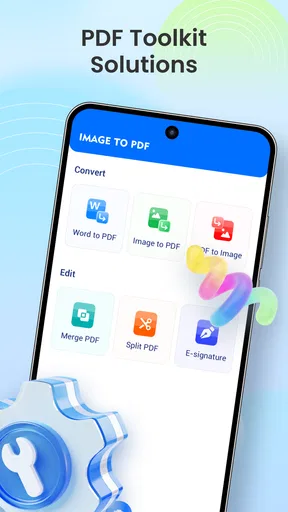
AI PDF Reader & Scanner is a mobile productivity app designed to scan paper documents, create PDF files, read existing documents, and use artificial intelligence to help users understand their content. Depending on the version and available features, it may recognize text with OCR, summarize pages, answer questions about a document, extract important details, and organize files for easier access.
Can AI PDF Reader & Scanner scan documents accurately?
The app generally performs best when documents are placed on a flat, well-lit surface and the camera is kept steady. Its scanning and OCR tools can detect printed text, receipts, forms, and notes, but accuracy may decrease with blurry images, unusual fonts, handwriting, shadows, or damaged pages. Users should always review recognized text before relying on it for official or important information.
Does the app require an internet connection to use its AI features?
Basic functions such as opening saved PDFs, viewing documents, and in some cases scanning pages may work without an internet connection. However, AI-powered tools—including summaries, document questions, translations, or cloud processing—may require an active connection. Availability can also depend on the specific feature, subscription plan, and app version installed on your Android or iOS device.
Is AI PDF Reader & Scanner free to download and use?
The application may be free to download, but some advanced tools can be limited by in-app purchases, subscriptions, usage quotas, advertisements, or premium plans. Before starting a trial, check the pricing page carefully, including renewal terms and cancellation instructions. Free access may still include essential scanning and reading features, while AI processing or unlimited exports could require payment.
Are my scanned documents and PDF files private and secure?
Privacy depends on how the app processes and stores documents. Files saved only on your device may remain locally available, while AI analysis, synchronization, backups, or sharing features could transmit content to remote servers. Before scanning sensitive documents such as identification, financial records, or medical information, review the app’s privacy policy, permissions, storage options, and deletion controls.
